A Google Forms alternative for when responses need answering, not counting
Google Forms is excellent at collecting answers and showing you the totals. Formisse is built for the forms where each response is a person waiting: summary, category and urgency on every submission, the moment it lands.
The one-line difference
Google Forms tells you what everyone said.
Formisse tells you what this one person wants, and whether it can wait.
Google Forms was built for surveys, and it is very good at them. Ask a hundred people a question and you get charts, counts and, since Gemini arrived in Forms in February 2026, an AI summary of the common themes across all the answers to that question.
That is genuinely useful when your form is a survey. It is the wrong shape entirely when your form is a contact form, a support request, a quote enquiry or a job application. Then you do not have a dataset. You have forty separate people, each wanting something different, and one of them is angry.
Formisse reads each submission on its own terms: what this person is asking for, what category it falls into, how urgent it is and what should happen next. That answer sits in the list before you open anything.
What Google Forms does well
We use it too. It is free, it is everywhere, and for a lot of jobs it is the right tool.
-
Free with any Google account
There are no response limits to worry about.
-
Instant Sheets integration
Every response lands in a spreadsheet you already know how to use.
-
Charts and counts
Generated automatically for multiple choice and scale questions.
-
Gemini summaries
Summarises open-text answers and groups the common themes across responses.
-
Universal familiarity
Nobody needs to be taught how to fill one in.
If you are running a survey, a poll, an event RSVP or a quiz, Google Forms is probably all you need and we would rather you kept using it.
Where Formisse is different
-
Per submission, not per question
Gemini in Forms summarises a question across all its responses: here are the themes in what people told you. Formisse summarises each submission on its own: here is what this person wants. If your form is a survey, the first is what you need. If your form is an inbox, the second is.
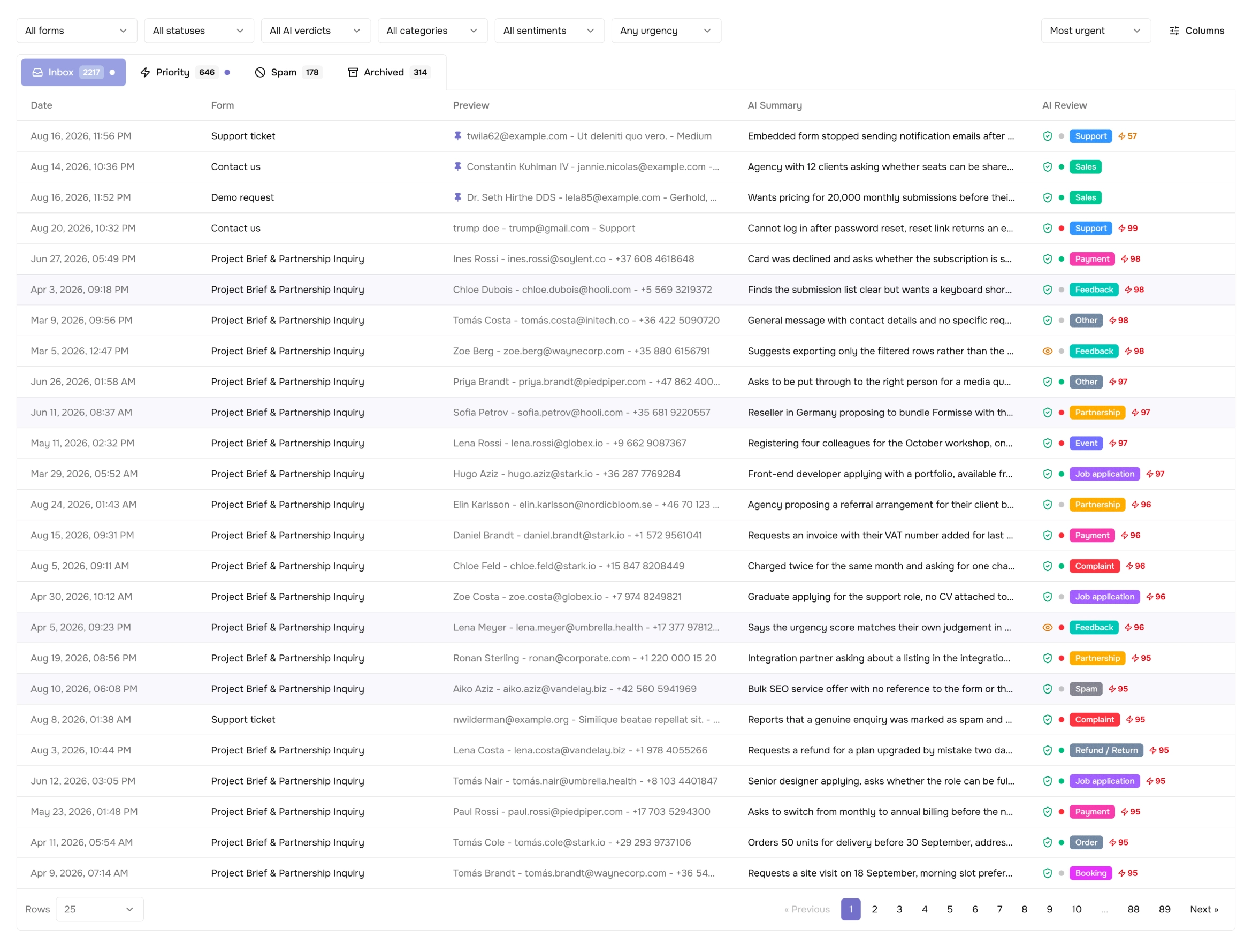
The submission list in Formisse. Each row is summarised on its own, rather than a question being summarised across responses. -
No response ceiling on the analysis
Google's response summaries work between 3 and 200 responses, and theme generation becomes unavailable once a form passes 200. Formisse analyses every submission regardless of how many you have received: the analysis happens as each one arrives, so there is no batch to be too large.
-
Urgency, not just themes
Formisse scores every submission for urgency and category and shows it in the list. Google Forms has no concept of one response mattering more than another. Every row in the spreadsheet looks the same as every other row.
-
An inbox, not a spreadsheet
Google Forms sends responses to Sheets, where they are rows. Formisse gives you an inbox: a priority tab, a spam tab you can browse, submission assignment, notes and statuses. If someone on your team has to act on responses rather than analyse them, a spreadsheet is the wrong container.
-
AI analysis without a Workspace plan
Gemini features in Google Forms require an eligible Google Workspace or Google AI plan; they are not part of a standard free Google account. Formisse includes submission analysis on every paid plan, starting at $8 per month billed annually.
Side by side
| Side by side | Formisse | Google Forms |
|---|---|---|
| What gets analysed | Each submission, individually | Each question, across all responses |
| When | Automatically, on arrival | When you open the responses tab |
| Response limit on AI analysis | None | Summaries 3-200; themes unavailable past 200 |
| Urgency scoring | Every submission | Not available |
| Spam handling | Separate browsable tab | Not available |
| Where responses live | Submission inbox with statuses and assignment | Google Sheets |
| Team workflow | Assignment, notes, permissions | Sheet sharing |
| Requires a paid plan for AI | From $8/mo. (annual) | Eligible Workspace or Google AI plan |
| Cost of the form builder | Free plan available | Free |
| Best for | Incoming requests someone has to act on | Surveys, quizzes, polls, RSVPs |
Competitor details verified from Google's support documentation, September 2026.
Which one should you pick?
Stay on Google Forms if
your form is a survey or a quiz, you care about the aggregate rather than the individual, and Sheets is where you want the data to end up. It is free and it is good.
Move to Formisse if
your form is really an inbox (enquiries, support, quote requests, applications) and the hard part is working out which of today's responses needs you first.
Questions people ask
Does Google Forms have AI?
Yes. Since February 2026, Gemini in Google Forms can summarise responses to open-text questions and group them into themes. It requires an eligible Google Workspace or Google AI plan. The summaries describe a question across all its responses; Formisse analyses each submission on its own as it arrives.
Is Google Forms free?
Yes, with any Google account, and Formisse has a free plan too. The difference shows up in what happens after a response arrives, not in the price of building the form.
Can I move my Google Form to Formisse?
Not automatically. There is no Google Forms importer, and we would rather say so than imply one exists. You rebuild the form in the Formisse builder, which for a typical enquiry or application form is a few minutes of work, and then share the Formisse link or embed in place of the Google Forms one. Everything already collected stays in your Google Sheet, so nothing is lost in the move.
Can Formisse handle surveys as well?
Yes, though if aggregate reporting across hundreds of survey answers is your main job, Google Forms plus Sheets is a perfectly good answer. Formisse earns its place when individual responses need acting on.
Do I lose my old responses?
No. Anything already in your Google Sheet stays there. Formisse starts analysing from the first submission it receives.
Some forms are surveys. Some are inboxes.
If yours is the second kind, see what it looks like when every submission arrives already read.
Start for Free