A Microsoft Forms alternative for request forms, not just surveys
Microsoft Forms is built to collect answers and report on them. Formisse is built for the forms where each response is a request someone has to handle: read, summarised, categorised and scored for urgency the moment it arrives.
The one-line difference
Microsoft Forms answers "how did the survey go?"
Formisse answers "which of these forty do I deal with first?"
Most Microsoft Forms usage inside a company is not really a survey. It is an intake form. The IT request form. The facilities ticket. The HR enquiry. The event registration. The supplier question form. Somebody sends the link, responses pile up in a list, and then a person opens that list and works through it.
Microsoft Forms handles the collecting part well. What it does not do is tell you anything about a single response before you read it. Every row looks like every other row. The one that says "our card reader is down and nobody can get into the building" sits between two holiday requests, looking identical.
Formisse treats that list as an inbox. Each submission gets read on arrival: what this person is asking for, what category it is, how urgent it is and what should happen next. The urgent one is visible without anyone opening anything.
What Microsoft Forms does well
If your organisation runs on Microsoft 365, Forms has real advantages we cannot match.
-
Included with Microsoft 365
No extra licence and no procurement conversation.
-
Single sign-on and tenant-level control
Built in, with your existing compliance and data-residency posture.
-
Excel integration
Responses land in a workbook your team already lives in.
-
Copilot in Forms
Can draft questions, refine a form, monitor responses and summarise results into an insights overview.
-
Quizzes and grading
Widely used in education.
If you are running an internal survey, a quiz or a poll across a Microsoft 365 tenant, Forms is the sensible choice and switching would be a mistake.
Where Formisse is different
-
Every submission, not the form as a whole
Copilot in Forms summarises your results: here is the overview of what came back. Formisse summarises each response on its own: here is what this person wants. For a staff survey the overview is the useful thing. For a request form it is not: you need to act on individual submissions, not on an average.
-
Analysis happens on arrival, without being asked
Copilot in Forms works in a chat pane you open when you want analysis. Formisse's analysis runs as each submission lands, so the answer is already in the list. Nobody has to remember to ask, and nothing waits for someone to open a panel.
-
Urgency, visible before you open anything
Formisse scores every submission for urgency and category and shows it in the list alongside a one-line summary of the request. Microsoft Forms has no notion of one response mattering more than another.
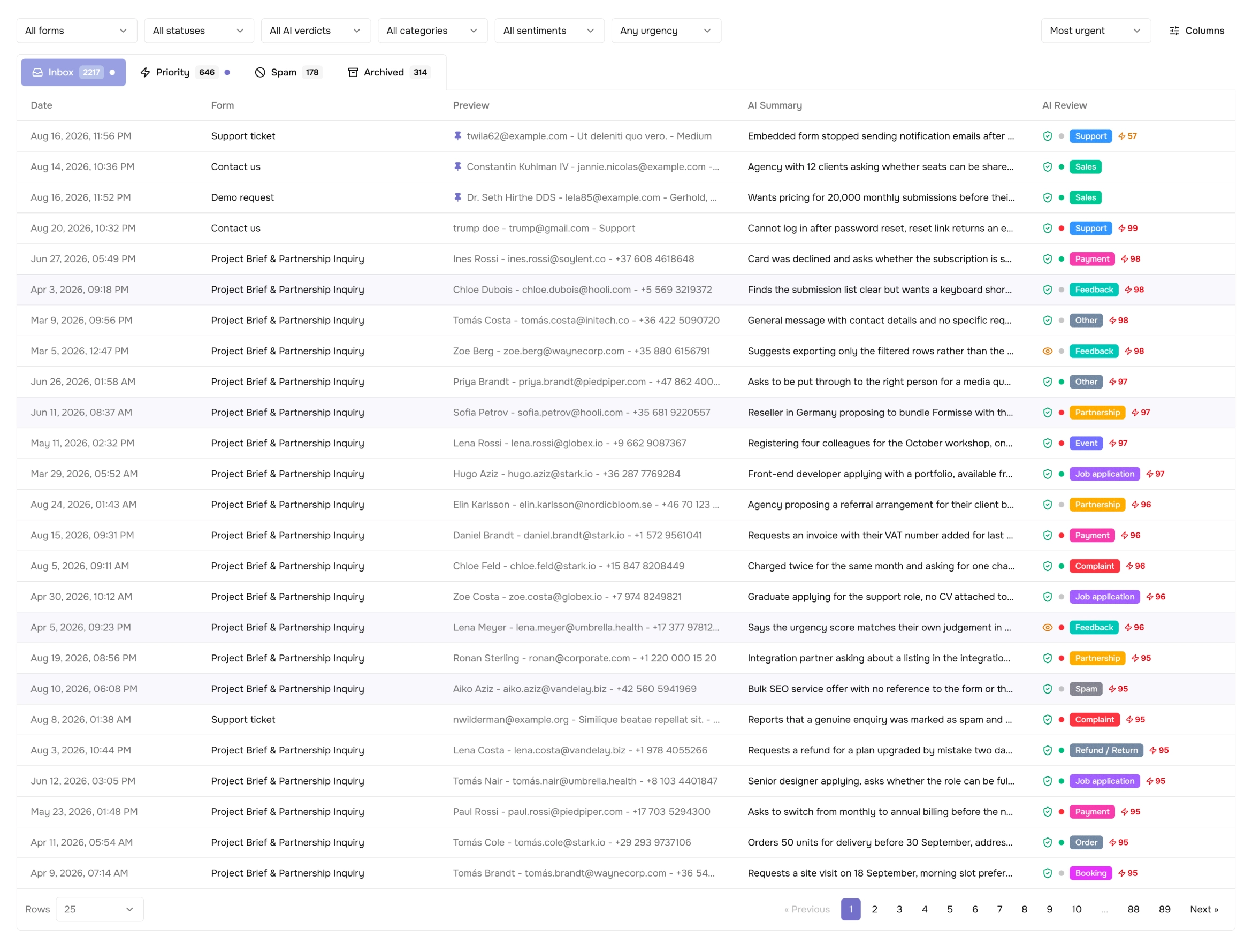
The submission list in Formisse. The urgent request is visible without opening a single row. -
An inbox with a workflow
Priority and spam tabs, submission assignment, notes and statuses. Microsoft Forms gives you a response list and an Excel export; the workflow around it is whatever your team improvises in a spreadsheet or a Teams channel.
-
No Copilot licence required
The Copilot chat experience in Microsoft Forms is limited to commercial users with an eligible Copilot licence. Formisse includes submission analysis on every paid plan, starting at $8 per month billed annually.
Side by side
| Side by side | Formisse | Microsoft Forms |
|---|---|---|
| What gets analysed | Each submission, individually | The form's results, as a summary |
| When | Automatically, on arrival | When you open Copilot and ask |
| Requires an extra licence for AI | No, included from $8/mo. (annual) | Eligible Copilot licence |
| Urgency scoring | Every submission | Not available |
| Spam handling | Separate browsable tab | Not available |
| Where responses live | Submission inbox with statuses and assignment | Response list and Excel |
| Team workflow | Assignment, notes, permissions | Sharing, plus whatever you build around Excel |
| Single sign-on / tenant control | Not offered | Yes, via Microsoft 365 |
| Cost | Free plan, paid from $8/mo. (annual) | Included with Microsoft 365 |
| Best for | Request and enquiry forms someone must act on | Surveys, quizzes and polls inside a tenant |
Competitor details verified from Microsoft's support documentation, September 2026.
Which one should you pick?
Stay on Microsoft Forms if
your forms are surveys or quizzes, you are inside a Microsoft 365 tenant, and IT governance or single sign-on is non-negotiable. It is included in what you already pay for.
Use Formisse if
the form is really a request queue (support, IT, enquiries, applications) and the person opening that list needs to know which one to handle first without reading all of them.
Questions people ask
Does Microsoft Forms have AI?
Yes. Copilot in Forms can draft and refine questions, help distribute a form, monitor responses and summarise results into an insights overview. The chat experience requires an eligible Copilot licence. It summarises a form's results when you ask; Formisse analyses each submission automatically as it arrives.
Can I use both?
Plenty of teams will. Keep Microsoft Forms for internal surveys and quizzes, and point Formisse at the forms where individual responses need handling.
Can I move a Microsoft Form into Formisse?
Not automatically. There is no Microsoft Forms importer, and we would rather say so than imply one exists. You rebuild the form in the Formisse builder, which for a typical request or enquiry form is a few minutes of work, and then share the Formisse link or embed in place of the Microsoft Forms one. Responses you have already collected stay in your Excel workbook, so nothing is lost in the move.
Does Formisse work with Microsoft 365?
Not directly, and we would rather be exact about that. There is no Teams, Outlook, Excel or SharePoint connector, no single sign-on and no tenant-level administration. Formisse accounts are created with an email address and a password. What does work: notification emails reach any mailbox, including a Microsoft 365 one, and Formisse connects to Zapier and Make, which can pass submissions on to Microsoft 365 apps. If single sign-on or tenant governance is a requirement for your organisation, Formisse is not the right fit today.
Is Formisse more expensive than Microsoft Forms?
Microsoft Forms is included in a Microsoft 365 subscription you are already paying for, so on the form builder alone, yes. The comparison worth making is against what the Copilot licence costs to get AI analysis, and against the time spent reading responses that did not need reading.
If your form is really a request queue
See what it looks like when every submission arrives already read, sorted and scored.
Start for Free